
UX/UI Designer

Toronto Cupcake
Website redesign
What is Toronto Cupcake?
Toronto Cupcake is a Toronto-based online bakery that focuses on handcrafted, premium cupcakes, especially for celebrations and special occasions. The brand serves both individual customers and businesses, offering custom cupcakes for birthdays, baby showers, weddings, and corporate events.
The business operates primarily as an online delivery-focused bakery, allowing customers to order through the website for same-day or scheduled delivery within Toronto and surrounding areas.

Project Overview
Duration
Tools
Role
Team
3 Weeks (Part-time)
UX Designer
Group of 4
Figma, Photoshop, Zoom, Maze
This project was completed as part of a UX bootcamp in collaboration with our program stakeholders. The work simulates a real-world client engagement, following an end-to-end UX process from research to solution.
Problem Statement
Following our meeting with the stakeholders, we identified several challenges affecting the website's ordering experience and overall business performance.
-
Customers are getting confused while trying to shop on the website.
-
Many users struggle to find the products they are looking for.
-
The buying process is not clear, and some customers leave before completing their order.
-
Delivery options are not explained clearly enough, which creates uncertainty and hesitation.
-
Important services like corporate ordering and vendor collaborations are not easy to find.
-
As a result, we may be losing potential sales opportunities.
These issues highlight the need to simplify the ordering process and provide clearer guidance to ensure a smoother and more successful customer journey.
Objective
To establish a clear and intuitive information architecture that enables users to easily find their desired products and complete the ordering process without confusion.
By creating a more structured navigation and smoother checkout experience, we aim to reduce friction in the customer journey while ensuring that key features such as "corporate ordering" are visible and easily accessible.
During the initial kickoff, the stakeholder tasked our team with evaluating and improving the website’s ordering process to create a more seamless and user-friendly experience.
Heuristic Evaluation
As an initial step, our team prioritized a heuristic evaluation before conducting user interviews or competitive analysis. This early assessment helped us uncover usability concerns, generate hypotheses, and better define the areas requiring deeper investigation.
%20Navigation%20Clarity%20Problem%20The%20hamburger%20menu%20on%20desktop%20is%20risky%20unless%20extremely%20min.png)
Usability Recommendations
Implementing these recommendations will reduce user friction, improve task efficiency, and create a more intuitive purchasing experience.
Due to project scope and time constraints, this evaluation focused on high-impact usability improvements, while visual and UI enhancements are proposed as a future phase.
High-Impact
-
Strengthen primary CTAs: Make Order Now, Add to Cart and Checkout visually dominant to guide user actions.
-
Product Card Structure: Apply a structured layout (Image, Name, Price, CTA)
-
Navigation Clarity: Replace with a visible top navigation bar and organize categories clearly.
-
Structured Cart Layout: Improve layout hierarchy and prioritize the checkout action.
-
Break up dense text: Replace large paragraphs with feature highlights for easier scanning.
Low-Impact
-
Visual and UI Enhancement:
Overall interface styling (typography, Visual polish, color pallet, etc.) can be modernized.
Validation Interviews
After the heuristic evaluation, we conducted 5 moderated usability sessions via Zoom using a Maze task-based test.
Task: Purchase a cupcake and complete checkout.
Observed friction:
-
Navigation clarity
-
CTA visibility
-
Checkout structure
These sessions validated and refined the high-impact usability findings.
311.9s
Avg. Completion Time
(5 Participants)
Survey Insights
To better understand user priorities in cupcake ordering, a survey was conducted with 35 participants.
The goal was to identify primary purchase occasions, information needs, and flavor preferences to inform IA and content prioritization.
Insight 1: Occasion Priority
Insight 2: Information Priority
Insight 3: Flavor Preference


Orders are heavily concentrated around birthdays and special events, indicating where product visibility and featured collections should focus.
Flavor descriptions and transparent pricing are the most critical decision factors during product selection.
Chocolate is the dominant flavor preference and should be prioritized in sorting and featured sections.
Key Behavioral Patterns
Users begin with celebratory intent, explore flavors to narrow choices, and rely on clear descriptions and pricing to finalize decisions.
Competitive Analysis
Objective: To analyze local competitors and identify usability patterns influencing purchase flow.
Competitors Snapshots

Cupcake Paradise
-
Visible top navigation supports quick product discovery
-
Clear category grouping reduces browsing confusion
-
Strong visual hierarchy for CTAs guides users toward purchase action

Sanremo Bakery
-
Pricing displayed directly on product cards improves comparison
-
Structured product layout enhances scanability
-
Prominent add-to-cart buttons encourage user action

Marvellous by Fred
-
Clear product cards with discriptions and CTAs support faster exploration
-
Strong “Order Online” CTA maintains task visibility
Market Patterns Identified
Across all competitors, several consistent patterns align with usability patterns and user survey findings:
-
Pricing transparency supports users' high reliance on clear price visibility.
-
Strong product descriptions underscore the importance of flavor clarity in decision-making.
-
Visually dominant primary CTAs maintain momentum in task completion.
-
Structured and clear layouts reduce decision friction and maintain momentum throughout the purchase flow, reinforcing users’ need for clarity and efficiency during celebratory purchases.
These patterns validate the behavioral priorities and usability gaps identified during research.
Persona
Emily Sweetman
Age: 38
Occupation: High school teacher
Tech Comfort: Moderate
Goals:
-
Plan celebratory purchases (e.g., birthdays and special events) with minimal stress
-
Compare flavors and pricing confidently before checkout
-
Complete purchases efficiently without confusion
Frustrations:
-
Limited ability to filter products by flavor or occasion
-
Insufficient flavor details and unclear pricing visibility
-
The checkout process is confusing

"When I’m planning a celebration, I don’t want to waste time figuring out where things are.”
Motivation:
-
Wants the celebration to feel special and well-prepared
-
Values clarity and efficiency when shopping online
Behavioral Summary line
Emily is an occasion-driven buyer who prioritizes flavor clarity, transparent pricing, and a streamlined checkout experience
Design Implication
User priorities around occasion-based browsing, flavor clarity, and transparent pricing directly shaped the restructuring of navigation and content hierarchy
Card Sorting
Objective: To understand how users mentally group cupcake-related content and validate the navigation structure derived from research insights.
Method:
-
6 Participants
-
Open Card Sorting
-
20 content items
-
Conducted remotely via Zoom + Miro

The raw groupings were synthesized into three dominant mental clusters, informing the final navigation structure.
Pattern 1
Occasion-Frirst Grouping
Participants frequently created categories based on celebrations (e.g., Birthday, Holiday, Wedding), reinforcing an occasion-driven mental model.
Pattern 2
Order-Centric Information
Delivery, pickup, fees, and order timing were grouped under purchase-related categories rather than product exploration.
Pattern 3
Policy Ambiguity
Refund and return policies were placed inconsistently, suggesting the need for contextual visibility rather than isolated navigation placement.
Design Implication
These insights informed a navigation structure centered around occasion-based entry points, while consolidating delivery and policy content under “Info” and embedding key order details within product pages.
Information Architechture - Site Map
Cart/ Checkout
Order Details
Delivery Details
Order Confirmation
Info
Order & Delivery
Policies & support
Delivery Time
Delivery Fee
Pickup information
Refund Plicies
Return Policies
FAQ
About
Our Story
Why us
Home
Occasions
Birthday
Wedding
Anniversary
Baby Shower
Corporate Events
Holiday Events
Cupcakes
Classic Flavors
Allergy Free
Always Available
Assorted Dozen
Build Your Own Box
The site map reflects an occasion-first navigation model, supported by product-based exploration and consolidated informational content to reduce primary navigation complexity.
User Flow - Birthday Purchase Journey
Scenario: Emily wants to order cupcakes for her child's birthday next Saturday.

This User flow integrates key user decision points identified through research, ensuring clarity in quantity selection and delivery scheduling.
Sketches and Low-Fidelity Exploration
Initial hand-drawn sketches were created to quickly explore layout hierarchy, checkout structure, and delivery decision points before moving into digital wireframes.
Product Page:
Initial sketch
Iteration

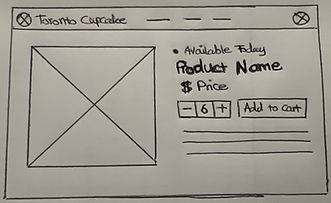
The layout was refined to prioritize product imagery and place product name, quantity selection, and price closer together.
Cart Layout:
Initial sketch
Iteration


The cart layout was improved to clearly surface pickup location and timing, allow quick quantity adjustments, and overview the total prices.
Checkout Layout:
Initial sketch

Iteration

The checkout flow was simplified to minimize friction, only collecting essential contact and payment information while keeping the order summary visible.
These early sketches were primarily used for internal exploration and rapid iteration. Instead of formal usability testing at this stage, I iterated quickly on layout ideas before moving to digital wireframes for further refinement.
The sketches helped explore layout ideas quickly. I then moved to mid-fidelity wireframes to refine spacing, component structure, and key interactions such as filtering, quantity selection, and checkout flow.
Mid-Fidelity Exploration
Design Response
Based on the usability findings and research insights, I redesigned key pages to improve product discovery, clarify navigation, and simplify the checkout process.
Key UX Issues Identified
Design Solutions
-
Users struggled with navigation clarity and category discovery
-
Users struggled to browse cupcake options quickly
-
Primary actions were not visually clear (low CTA visibility)
-
Checkout took too long (311s average)
-
Pickup/delivery info unclear
-
Dense content/ scanability
-
Introduced a clear top navigation and occasion-based browsing structure
-
Used product grid layout with structured cards
-
Emphasized primary CTAs (Shop Now / Add to Cart / Checkout)
-
Simplified checkout flow
-
Surfaced pickup and order info clearly
-
Replaced dense text with scannable bullet sections


Usability Testing
To validate the redesigned experience, we conducted a moderated usability testing session focusing on the cupcake purchasing flow.
Participants:
-
5 participants
-
Ages 22-40
-
Frequent online shoppers
Task:
Participants were asked to imagine they were planning a birthday celebration and needed to order cupcakes for the event. Their task was to:
Find cupcakes you like, place an order, and choose pickup during checkout.
Testing outcome
Participants were able to complete the cupcake purchasing task without major confusion.
Task success rate: 5/5 participants completed the task successfully.
Key improvements observed:
-
Faster product discovery through occasion-based navigation
-
Easier comparison using structured product cards
-
Reduced uncertainty with clear pickup and availability information
-
A simplified checkout flow that reduced friction and made the ordering process easier to complete.
Design Iteration
Based on usability testing feedback, two refinements were introduced to improve navigation clarity and support event-based ordering.
(1) Breadcrumb Navigation
Impact:
-
Improves navigation clarity
-
Reduces reliance on the browser back button

After usability testing
Before usability testing
(2) Bulk Order Feature
Impact:
-
Supports large event orders
-
Reduces frictions for high-quantity purchases

After usability testing
Before usability testing
Final Mid-Fidelity Solution
The final mid-fidelity prototype demonstrates the redesigned cupcake purchasing flow.
The experience focuses on improving product discovery, simplifying navigation, and reducing friction in the checkout process.
Prototype
The prototype focuses on improving usability and information architecture rather than final visual design, demonstrating the redesigned cupcake purchasing flow from browsing to checkout.


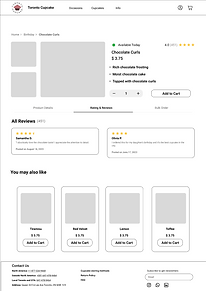


Redesigned the cupcake purchasing journey from discovery to checkout
Key Improvements in the redesigned flow:
-
Clear top navigation with occasion-based browsing
-
Structured product cards for easier scanning
-
Simplified cart and checkout flow
-
Clear pickup and order information
-
Breadcrumb navigation for easier navigation
-
Bulk order option for event-based purchases
Reflection
What I learned
-
Designing navigation around users’ mental models, such as browsing cupcakes by occasion, can significantly improve product discovery.
-
Early usability evaluation helped identify friction in the checkout process and highlighted the importance of clear order information.
-
Structuring product cards and simplifying the checkout flow improved the overall clarity of the purchasing journey.
-
Iterating on the design based on feedback helped refine the experience and align the solution more closely with user needs.
Next Steps
-
Develop high-fidelity visual designs to refine typography, color, and visual hierarchy.
-
Conduct additional usability testing with the interactive prototype to further validate the redesigned flow.
-
Expand the bulk order feature to better support large event purchases.